Actions
Actions define the tools reviewers have to handle unallowed content. For each type, you can define the available actions. They work with Webhooks. Whenever an action is fired, UGC Guard will call the set webhook url and send a signed payload. This way, your service can verify the request and handle the action.
Defining Actions
Go to Types & Actions in the admin dashboard.
INFO
Types and actions are read-only for members. Admins can create, edit and delete types and actions. The action secret is only available to admins. Currently, defined actions are available to all reviewers, members and admins.
Choose a type and edit it.
- Add a name
- Describe the action
- Add the WebHook url.
- Choose if this action is destructive (aka. deletes the content)
DANGER
Destructive actions are dangerous and should not be implement. Instead of deleting content, implement actions that tombstone/quarantine content. This way you can keep the reported content for legal reasons, if necessary, or to undo changes, if the user successfully appeals.
Webhooks
When an action is fired, UGC Guard will call the webhook url with the given payload:
{
    "report_id": "UGC_ID",
    "action_id": "UGC_ID",
    "action_name": "Tombstone message",
    "type_id": "UGC_ID",
    "content_id": "UGC_ID",
    "content_upi": "ID of the object on your service.",
    "content_extra_data": "Extra data send to the client on this content",
    "on_user": "true/false",
    "on_user_id": "UGC_ID of the creator, or none if not on_user",
    "on_user_upi": "ID of the creator on your service, or none if not on_user",
    "performed_by_id": "UGC_ID of the reviewer that performed this action",
    "timestamp": "Timestamp of when the action was fired, in milliseconds since epoch",
}
This payload is signed using the "action secret" of the type. You should verify the signature of the webhook!
DANGER
Without verifying the signature of the webhook payload, anyone can abuse your endpoint and manipulate data on your server.
This is how you can verify the webhook signature using a FastAPI or TypeScript backend:
from fastapi import FastAPI, Request, Body, Header
from typing import Annotated
from ugc_guard_python.ugc_guard_python import GuardClient

@app.webhooks.post("/action/")
def action_webhook(
        request: Request,
        body: dict = Body(..., description="The webhook body containing the action data."),
        x_action_signature: Annotated[str | None, Header()] = None,
):
    """
    This endpoint is used to receive action webhooks from the UGC Guard service.
    :param x_action_signature: the signature of the webhook, used to verify the authenticity of the request (part of the header).
    :param body: The webhook body containing the action data.
    :param request: The request, containing the header of the webhook.
    :return:
    """

    # Check the header of the request to verify the secret.

    # Load the action secret from environment variables
    # If you have multiple types, make sure to choose the correct secret here
    secret = os.getenv("UGC_GUARD_ACTION_SECRET") # this should be set in your environment variables

    if not secret:
        raise ValueError("UGC_GUARD_WEBHOOK_SECRET environment variable is not set.")

    # Check if the X-Action-Signature header is present
    if not x_action_signature:
        raise ValueError("X-Action-Signature header is missing.")

    # Verify the signature using the GuardClient's verify_signature method
    valid_signature = GuardClient.verify_signature(body, secret, x_action_signature)

    if not valid_signature:
        raise ValueError("Invalid signature in the X-Action-Signature header.")

    # Advanced: To enhance security, check that the timestamp is not too old.

    # Proceed

    return "200"
# If you do not want to install or use the UGC Guard package for python
# This is the method to verify the signature


import hashlib
import hmac
import json


def verify_signature(payload_body: dict, secret_token: str, signature_header: str) -> bool:
    """Verify that the payload was sent from UGC Guard by validating SHA256.

    Args:
        payload_body: original request body to verify (request.body())
        secret_token: UGC Guard webhook token (WEBHOOK_SECRET)
        signature_header: header received from UGC Guard (x-action-signature)

    returns:
        bool: True if the signature is valid else False.
    """
    if not signature_header:
        return False
    hash_object = hmac.new(secret_token.encode('utf-8'),
                            msg=json.dumps(payload_body, sort_keys=True).encode("utf-8"), digestmod=hashlib.sha256)
    expected_signature = "sha256=" + hash_object.hexdigest()
    if not hmac.compare_digest(expected_signature, signature_header):
        return False

return Trueimport type { UserConfig } from 'vitepress'
const config: UserConfig = {
// ...
}
export default configTIP
We are using the same signature protocol as GitHub, so any example for GitHub Webhooks also holds true for UGC Guard Webhooks.
Action history
Each performed action is logged.
- If an action is performed on the creator of content, UGC Guard maps the action to the creator object. Whenever they appear as a creator again, reviewers can see that this creator was already subject to an action before.
- If an action is performed on content (either as main content or as context), UGC Guard maps the action to the unique ID of the object.
Press the bolt icon, then choose History to see the performed actions on either a creator or content.
TIP
We log all performed actions, whether they were successful or not. You can not remove the logs, as they might stay relevant for legal matters. If you want to introduce someone as a new person, attach a # to their unique partner id. Make sure your webhook service ignores # at the end of the unique partner id.
Webhook Logs
UGC Guard provides comprehensive tracking of all outgoing webhooks. Webhook logs are organized by organization and can be reviewed on the Logs page.
Retention Time and size
For both the self-hosted version and the free tier, webhook logs are retained for 3 days. We store response bodies of up to 5MB of size.
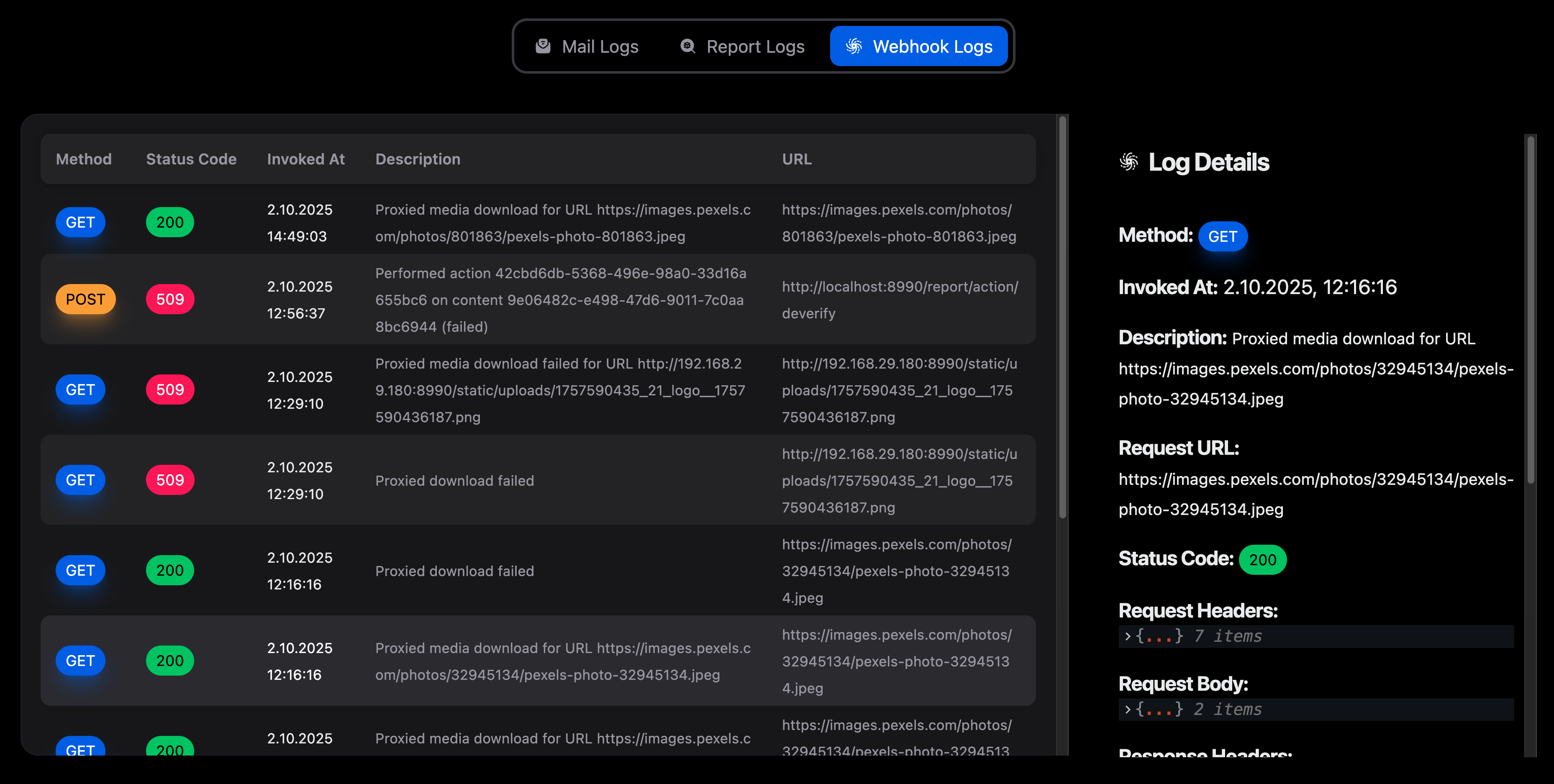
Each log entry includes all request headers, the payload, response headers, response body, and the response status code. If the response body is an image, HTML content, or JSON, it will be rendered for easier inspection. Plain text bodies are also displayed. Status code 509 indicates that the request could not reach the target server.
Localhost
If your service is running on localhost, UGC Guard and its webhooks will not be able to reach endpoints it. To test webhooks locally, consider using a tunneling service (such as ngrok) to expose your local server to the internet, or manually replay webhook requests using the headers and payloads provided in the webhook logs.